Connect your research
Bring the work you identify as yours into your signed-in research view.
Explore Influence
Explore a research record, inspect its reach signals, and check what the underlying evidence supports. The actual Influence interface below uses a completely fictional profile.
Connected works, personal evidence and saved reports stay in your account. The public screenshot contains no account records.
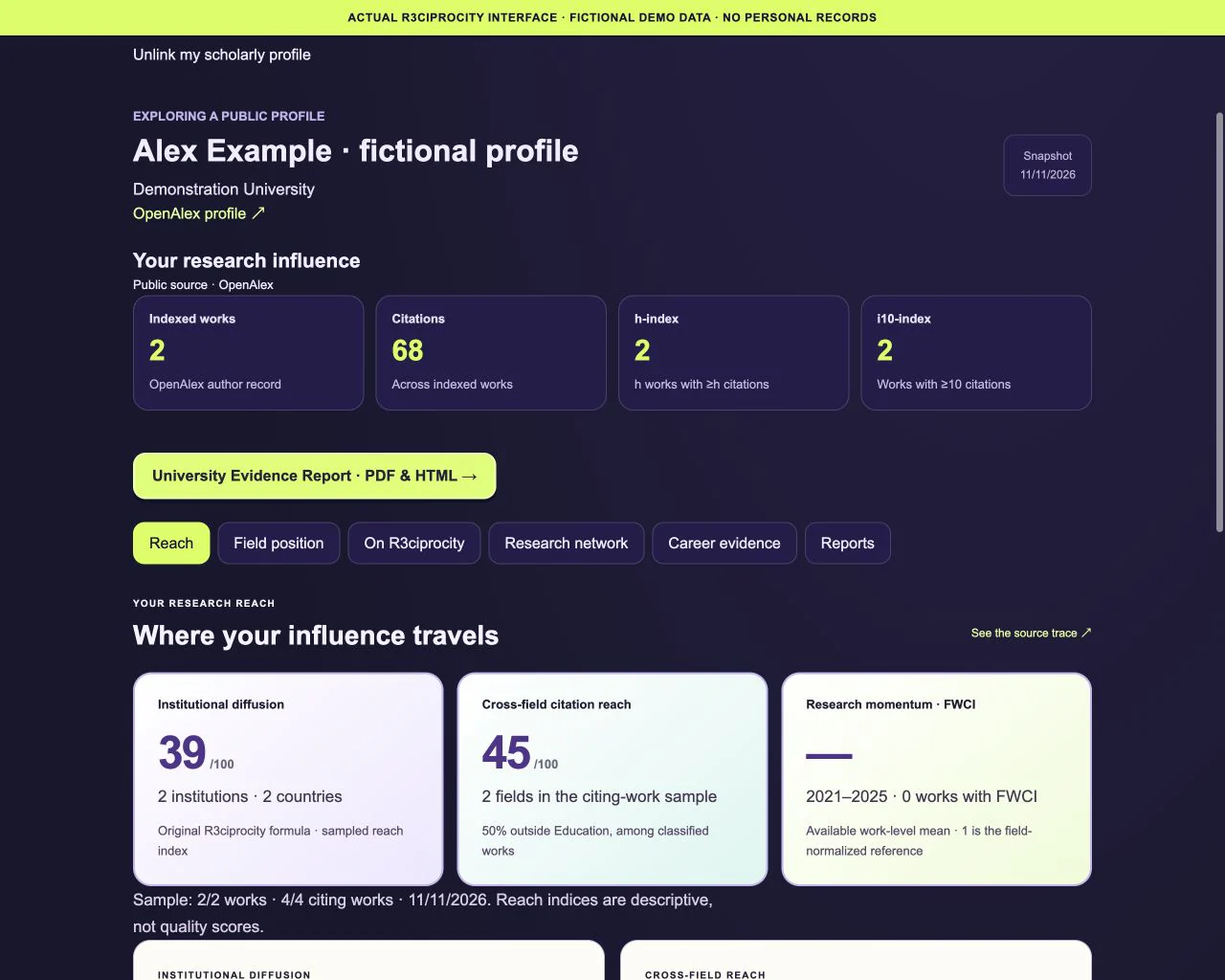
The actual Reach view with invented publications, counts and affiliations. None of these numbers describe a real person, institution or account.
Worked example
Invented profile, papers, affiliations and metrics in the actual interface. No real research impact is claimed.
The fictional Alex Example profile has two indexed works and 68 citations. Treat these as a record summary, then open the Reach view shown above.
The example contains four citing works with two institutions, two countries and two fields. The view shows the sample coverage and leaves unavailable FWCI as a dash.
Follow the source trace before describing a connection as use or support. A citation can provide background or disagree; reach indices and citation totals are not quality scores.
There are no real citation totals in this example: every name, affiliation and count is fictional. The interface shows how to inspect source coverage and missing evidence. The sample does not verify a researcher’s identity, establish agreement with a paper or demonstrate a causal effect on a decision.
Bring the work you identify as yours into your signed-in research view.
Inspect the available record behind a connection before interpreting it.
Separate recorded attention from claims about quality, use or causal impact.